
Configuration is code’s other half
A service’s behaviour is not only its logic and its policies — it is also its configuration. Most systems handle this badly: settings are scattered across property files, environment variables and hard-coded constants, a change means a redeploy, and per-customer differences turn into per-customer branches.
cconfig (the cconfig repository) applies Chenile’s usual discipline to configuration: a small client interface, modular ownership, pluggable sources, and change by configuration rather than by code.
Each module owns a JSON file
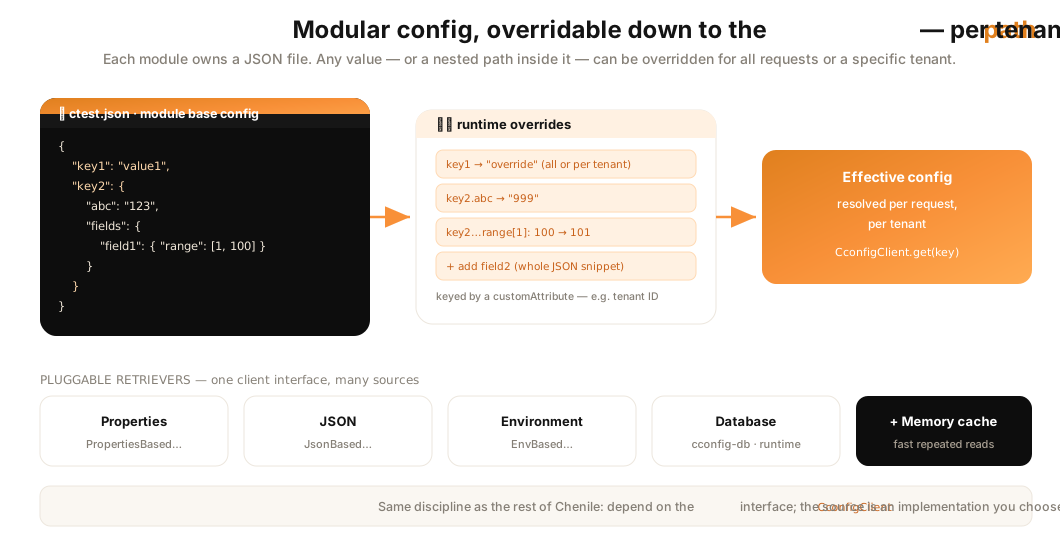
Instead of one giant properties blob, every module defines its configuration in a JSON file named after the module. A value can be a simple string or an arbitrarily nested JSON object:
// ctest.json — one module's config
{
  "key1": "value1",
  "key2": {
    "abc": "123",
    "fields": {
      "field1": { "range": [1, 100] }
    }
  }
}
This keeps configuration close to the module that owns it, and makes the shape of each setting explicit.
Override anything — down to the path — at runtime
The feature that sets cconfig apart is granular runtime override. You are not limited to replacing a whole value; you can override a specific path inside a complex value, or even graft in a new JSON snippet. From the base above, cconfig can:
- override
key1with a new value; - override just
key2.abcwhile leaving the rest ofkey2intact; - change
key2.fields.field1.range[1]from100to101; - add a brand-new
field2(an entire JSON snippet) to the value.
None of this requires editing the base file or redeploying — overrides are applied at runtime.
Per-tenant configuration with a custom attribute
Overrides can apply to every request, or only to requests that match a custom attribute. In a SaaS product that custom attribute is naturally the tenant ID — so key1 can hold one value for tenant A and another for tenant B, resolved automatically per request. The custom attribute isn’t limited to a single header; it can be a combination of request headers defined to suit an installation.
One client, many sources
Your code reads configuration through a single client interface — CconfigClient — and the source is a pluggable implementation. cconfig ships several retrievers behind that interface:
- Properties (
PropertiesBasedCconfigRetriever) — classic property files. - JSON (
JsonBasedCconfigRetriever) — the modular JSON files above. - Environment (
EnvBasedCconfigRetriever) — 12-factor style env overrides. - Database (
cconfig-db·DbBasedCconfigRetriever) — store and change configuration in a database at runtime, with a controller and repository for managing it. - A memory cache sits in front for fast repeated reads.
Because the source sits behind the client, you can start with JSON files and later move overrides into a database — for a live admin UI, say — without touching the code that reads configuration. That is the same “separate the interface from the implementation” move you’ve seen throughout Chenile, applied to configuration.
org.chenile.cconfig.sdk.CconfigClient. Retrievers: PropertiesBased…, JsonBased…, EnvBased…, MessageBundle…, and DbBasedCconfigRetriever (in cconfig-db). Model + service: Cconfig, CconfigService. All ship in the cconfig repository.